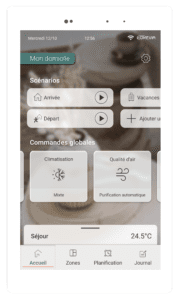
Scheduling is used to execute one or more orders at a given time and day(s). You can create them from the tablet’s Scheduling tab. To find out more: https: //youtu.be/YTTc4HjkAX0
Global commands affect all zones simultaneously. For example, if you’re going to be away for a day and want to reduce your energy consumption, you can activate the “Eco” mode for all rooms using the global heating/air-conditioning command.
Purification improves the air quality in your home. You can start it manually or program it using a schedule. It is activated for all rooms in the home and takes priority over temperature control. The effectiveness of purification depends on the filter installed in the ceiling unit. There are two types of filter: the G4 filter, which offers standard filtration, and the F7 filter. guaranteeing high filtration efficiency (85% of fine particles and 60% of ultra-fine particles). If you have a G4 filter, you can replace it with an F7 filter.
When purification is activated, all zones are treated.
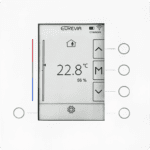
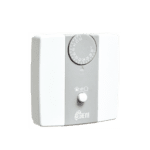
If there is no connection between your thermostat and your touchscreen interface, there are three possible scenarios:
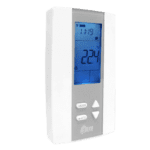
1. The battery icon on the thermostat indicates that the batteries are low; you will need to replace both batteries.
2. The thermostat’s connection icon shows a single dot, which means it is out of range of the touchscreen interface. Check that the touchscreen interface is working properly. If the thermostat has been moved, return it to its original position.
3. If the thermostat’s connection icon shows a crossed-out signal, you need to resynchronize the thermostat and the tablet from the advanced settings of the relevant zone.
If you wish to limit the sound level of your installation, activate ‘Silent’ mode from: Home → Global Commands heating/air conditioning → Advanced Settings → Ventilation Power: Silent / Normal / Increased.
(Note: reducing the ventilation power of the system impacts its thermal performance.)
2. If this adjustment is not sufficient to achieve your desired comfort, you can contact our customer service to proceed with advanced adjustments.
The system maintains the desired ambient temperature in each room.
Reduced mode:
Allows you to reduce energy consumption at night or during short periods of absence.
The system maintains an ambient temperature above 18°C and below 27°C depending on the season, these values are adjustable in the advanced settings.
Eco Mode:
Allows for a significant reduction in energy consumption during extended periods of absence.
The system maintains an ambient temperature above 15 °C and below 30 °C depending on the season, these values are adjustable in the advanced settings.
“Stop” mode:
The system is completely shut down, unless the temperature drops below 10 °C, to prevent freezing. To be used in case of prolonged absence.
(Note: “Reduced” and “Eco” modes limit energy consumption over selected periods by shifting temperature setpoints. This implies a reduction in fan running time and heat or cold production).
If the software version of your touchscreen interface is earlier than version 2.1, the “Boost” mode is activatable zone by zone from the different zones of the touchscreen interface.
When the “Boost” mode is enabled, ventilation is boosted to quickly bring the housing to temperature (warm or cold depending on the season).
If the “Boost” mode is active in one zone and a second zone is requesting heating or cooling, that second zone will also benefit from “Boost” mode.
The “Boost” function automatically stops when the desired temperature is reached.
From version 2.1 onwards, the “Boost” mode can be activated from the global controls. It acts on all rooms in the home, and stops automatically when all rooms reach the required temperature, or after a programmed time (2 h by default, customizable).
It is impossible to isolate a room to increase air flow, as the ventilation system operates globally. However, it is possible to increase the overall power of the machine’s fan from: Home >Global heating/air conditioning controls >> Advanced settings >Ventilation power: Silent/Normal/Increased.
In the event that your ventilation is still active, it is possible that the purification mode is manually configured: Mini / Medium / Maxi. For the ventilation to stop automatically according to your heating or cooling needs, your air quality management must be in ‘Auto’ mode.
Filter maintenance is essential for the proper operation of your system and to ensure good air quality throughout your home. We recommend changing filters atleast oncea year under normal operating conditions.
As a sophisticated IT product, it is necessary for the touchscreen interface to reboot to ensure proper system operation. If necessary, the reboot is managed by the touchscreen itself.


 guaranteeing high filtration efficiency (85% of fine particles and 60% of ultra-fine particles). If you have a G4 filter, you can replace it with an F7 filter.